SliceTCI

One connection instead of CAT + DAX.

A TCI server for FlexRadio on Windows. Point WSJT-X, JTDX or any TCI client at a localhost port and it controls a slice and gets its audio straight from the radio over the network. No serial ports, no virtual audio cables, and no SmartSDR DAX.

Version 0.6 · formerly FlexTCI · open source
Windows 10/11 · one .exe, no installer · needs SmartSDR running · one TCI port per slice, 2–8 slices by radio model · free, MIT licensed
Not a product of FlexRadio Systems
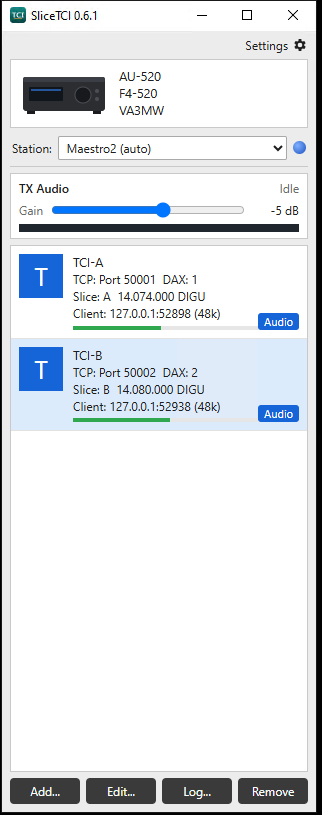
Two slices, two WSJT-X instances: FT8 on Slice A, FT4 on Slice B
Two WSJT-X windows decoding at once through SliceTCI 0.6.1 on an AU-520: FT8 on 14.074 MHz using Slice A on port 50001, and FT4 on 14.080 MHz using Slice B on port 50002

What it does

TCI puts rig control and audio on a single WebSocket. SliceTCI speaks TCI to your programs on one side and the SmartSDR API and DAX streams to your FlexRadio on the other.

⇄One port per slice

As many slices as your radio has (2, 4 or 8): Slice A on port 50001 with DAX 1, Slice B on 50002 with DAX 2, and so on. Each WSJT-X or JTDX instance gets its own slice. Several clients can share a port, for example WSJT-X and a logger, and they stay in sync.

∿Audio straight from the radio

Receive and transmit audio travel as DAX streams over the network, resampled to whatever the client asks for. SmartSDR DAX and the Windows DAX sound devices aren't needed. Each channel has its own RX level.

⏻Safe transmit

Only one client can transmit at a time. The radio unkeys if that client disconnects, crashes or stops sending audio. Transmit started in SmartSDR is never dropped by a client.

✓Gets the slice ready

When a client transmits its own audio, a slice left in USB or LSB is switched to DIGU or DIGL, and TX DAX is turned on if it was off, so the audio reaches the transmitter. You can turn this off.

⌖Spots on the panadapter

TCI spots from your client show on the SmartSDR panadapter and clear themselves after 15 minutes. Click one in SmartSDR and every TCI client is told. Your cluster and N1MM spots are left alone.

☰A log you can read

Filter by level or text, and optionally capture every TCI and radio API line. Each transmission logs a summary of how long it was keyed and how much audio arrived. Logs are kept daily.

How it fits together

Your programs only ever talk to localhost. SliceTCI keeps the one connection to the radio.

WSJT-Xws://127.0.0.1:50001
JTDXws://127.0.0.1:50002
Loggerws://127.0.0.1:50001
⇄
SliceTCIone TCI port per slice
⇄
Slice controlTCP 4992 · SmartSDR API
Receive audioUDP · DAX RX stream per slice
Transmit audioUDP · DAX TX stream

SmartSDR, or another GUI client, must be running because it owns the slices. In multiFLEX, SliceTCI binds to the station you choose, so "Slice A" means that station's Slice A.

Getting started

Settings and logs live in %APPDATA%\SliceTCI.

1Download and run

Get SliceTCI-<version>.exe from the latest release and run it. Windows SmartScreen may ask once because the exe isn't code-signed: choose More info › Run anyway. Allow it through Windows Firewall, since the radio's audio arrives over UDP.

2Pick your radio

With SmartSDR running, choose your station. The default is one channel: Slice A on port 50001 with DAX 1. Add a second channel to use Slice B.

3Keep it tidy

Settings › Install to Program Files copies the exe to C:\Program Files\SliceTCI and adds a desktop shortcut. Check for updates fetches a new release, verifies it, and restarts.

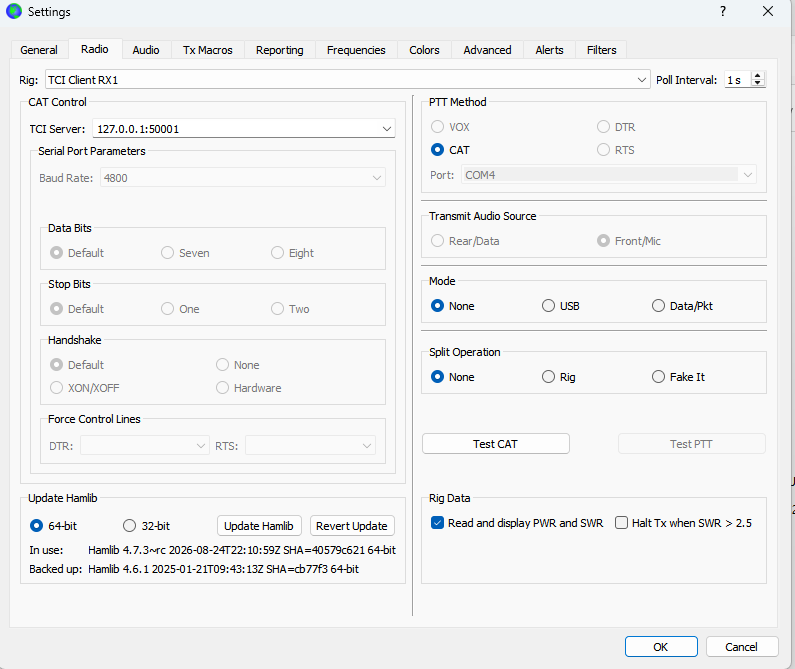
The SliceTCI 0.6.1 window: an AU-520 on station Maestro2, the TX audio gain at −5 dB, and two channels, TCI-A on port 50001 with Slice A at 14.074 MHz DIGU and TCI-B on port 50002 with Slice B at 14.080 MHz DIGU, each with a client receiving audio
Two channels, each with a client connected

Setting up WSJT-X

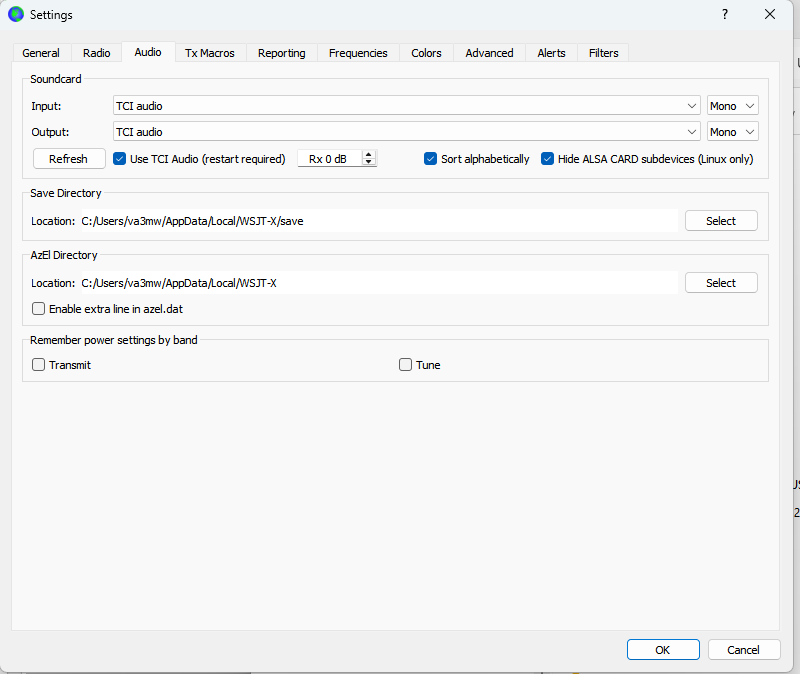
Two tabs in WSJT-X Settings. JTDX is the same idea.

1 · Radio

  • Rig: TCI Client RX1
  • TCI Server: 127.0.0.1:50001 (the channel's port)
  • PTT method: CAT
  • Mode: None. SliceTCI switches to DIGU/DIGL itself when transmitting.
  • Split operation: None or Fake It
WSJT-X Settings, Radio tab: Rig TCI Client RX1, TCI server 127.0.0.1:50001, PTT method CAT, Mode None, Split None

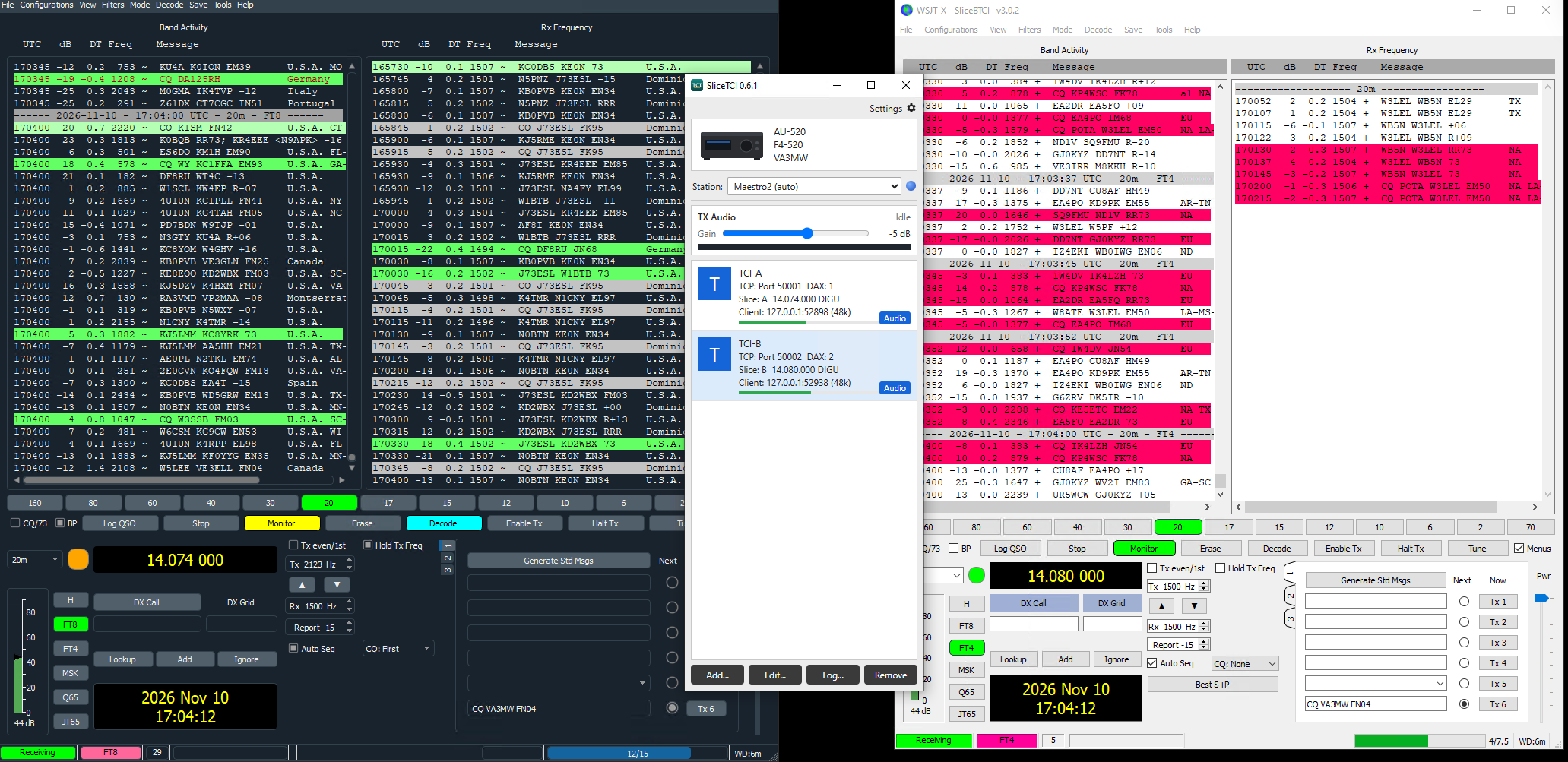
2 · Audio

  • Tick Use TCI Audio (restart required)
  • Set Input and Output to TCI audio
  • Restart WSJT-X
  • Set the receive level with SliceTCI's RX dB for the channel, aiming for about 30 dB on the WSJT-X meter.
WSJT-X Settings, Audio tab with Use TCI Audio ticked and Input and Output both set to TCI audio

For a second slice, start another instance with wsjtx --rig-name=SliceB and point it at port 50002.

Rig Control Error at start-up? WSJT-X may say TCI audio cannot be started as frequency is OOB even when the slice is on a normal frequency. It's a timing race inside WSJT-X, not a SliceTCI fault. Click Retry, or open WSJT-X Settings and close it with OK, and it works normally.

Kept on your PC

TCI has no password, so SliceTCI keeps it local. TCI ports listen on localhost only, never on your network. Connections from web pages are refused, so a website you visit can't open your radio. Audio is accepted only from the radio's own address.

Remote radios

It works over a VPN or Tailscale too. The audio is UDP, which doesn't resend lost packets, so a poor link can mean fewer decodes or gaps in transmitted audio. A wired, low-latency connection gives the best results. SmartLink isn't supported yet.

Tested so far

Here's where it stands.

WorkingFLEX-6600M with WSJT-X 3.0 and JTDX, each on its own port and slice. AU-520 on SmartSDR v4.3.16 with WSJT-X improved 3.0.2.
Still to checkMSHV and Log4OM, and the TX level that gives full rated power.
Not yetSplit (VFO B as TX), CW macros, meters, IQ and SmartLink. A slice that isn't the TX slice doesn't follow a band change made outside SliceTCI.

TCI coverage

Phase 1 of the TCI requirements draft. Commands outside this list are ignored and logged once.

AreaCommands
Start-upprotocol, device, trx_count, vfo_limits, modulations_list (from the radio's own mode list), full state, ready
Tuningvfo, modulation, rx_filter_band, rit_*, xit_*; dds and if read-only
Transmittrx (including TCI audio), tune, drive, tune_drive, tx_enable
Audio8, 12, 24 and 48 kHz; sample type, channels and block size as the client asks; TX_CHRONO pull model
Spotsspot, spot_delete, spot_clear in; clicked_on_spot out

Build from source

Go with Wails for the window. The interface is one plain HTML file, so there's no Node.js build step and no C compiler.

# tests, including end-to-end runs against a fake radio
go test ./...

# Windows exe in build\bin
wails build
Go Wails TCI SmartSDR API VITA-49 DAX MIT